72 Hour Booking data for Greenville, SC is available online 24/7, letting families and attorneys quickly locate recent jail bookings. By entering a name, booking number, or date you can run a 72 hour booking search that pulls the latest booking records, detention details, and booking photographs. The portal updates every few minutes, so you’ll see if a new inmate appears within the three‑day window, and it flags any missing charge information or delayed posting.
72 hour booking lookup tools also clarify common questions: why a recent booking might not be listed, how often records refresh, and what the booking status means before court filings. Users can filter results by facility, arresting agency, or bond amount, then view mugshots and booking time stamps. This transparent approach helps you verify custody status, locate a booking record by number, and understand the difference between arrest and booking.
How to Search 72 Hour Booking
A 72 Hour Booking search checks recent booking records for the Greenville County detention facility. It can help families and attorneys look for recent jail bookings by name, date, or booking number. Users can also reference recent bookings for additional information. A result records an arrest and intake event; it does not establish guilt or a later court outcome. Posted times, the 72-hour display window, and public-record rules can affect what appears.
Official Search Portal: https://greenvillecountysc.gov/disclaimer/InmateSearch.aspx
Steps to Search
- Open the Greenville County inmate search page at the official county address above. Stay on the greenvillecountysc.gov domain rather than using an unverified third-party booking site.
- Read any notice, disclaimer, or warning shown by the county before using the results. The notice may cover record limits, permitted use, or details that the county does not post.
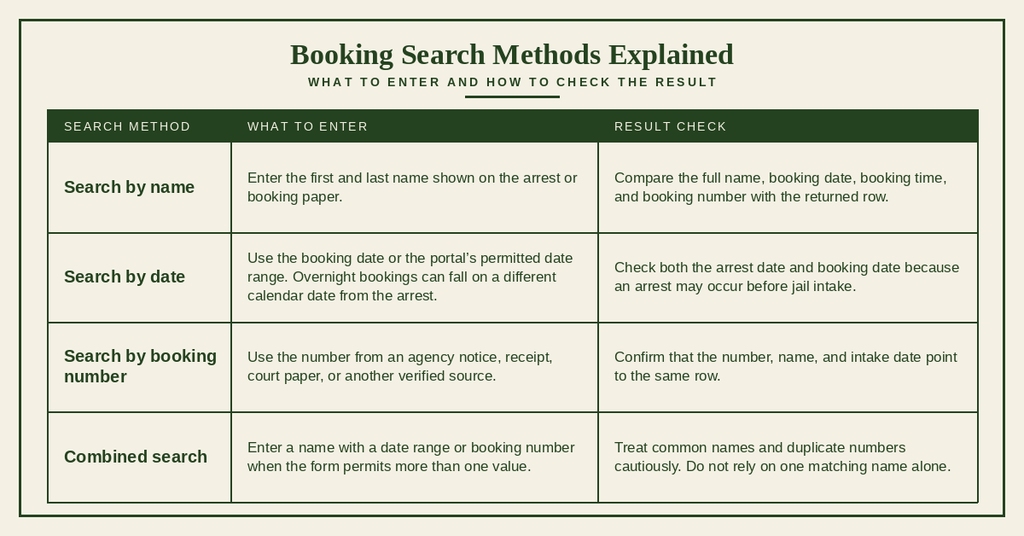
- Locate the name field and enter the person’s first and last name as shown on the booking record. Add a middle name, suffix, or nickname only when the search form calls for it.
- Use the date field when you know the approximate booking date. Select the booking date rather than the arrest date if the record shows two different dates.
- Enter a known booking number in its own field when one is available. Copy each digit or character exactly, and do not add spaces or remove a leading zero unless the form asks for that format.
- Apply a facility, custody-status, or date-range filter only when that choice appears in the portal and you know the correct value. An empty or unclear field should stay at its default setting.
- Submit the search and check each result for the booking number, booking date and time, facility, custody status, and other known facts. A name by itself may match more than one person.
- For a matching person, open the booking row and review the listed charges, bond, release data, photograph, and record-posting time. Compare several fields before drawing a conclusion.
- If the first search returns no row, follow the delay and name-checking steps later on this page before treating the absence as proof that no booking occurred.
Search Methods by Name, Date, and Booking Number
Choose the search field that matches the fact you already know. A booking number gives the most exact result when it is correct. A name search works best when paired with a date or another fact, since two people can have the same name.
Fields to Compare After a Match
A booking row may contain several time-sensitive fields. Read each field for its stated purpose rather than treating the row as one combined fact. A blank field can mean that a value has not been posted, has been withheld, or does not apply.
A jail booking record may include a booking number, booking date and time, arrest details, custody status, detention facility, and arresting agency. Check these fields carefully, as the arrest location may differ from the booking facility, and processing delays can separate the arrest time from the booking time.
Charge descriptions, charge status, and bond amounts provide details recorded at intake but may change as the case progresses. A listed bond amount does not confirm payment or release. Release dates and transfer records can show custody changes, while an empty field may indicate missing or delayed information.
The record-posting date shows when the information appeared online, which may be later than the actual arrest or booking event. For the most accurate details, compare the booking number and dates with official jail or court sources.
Use at least two matching facts before acting on a result. A name, photo, and common date can still belong to the wrong person. A booking number paired with the correct intake date offers a firmer link between the row and the event you are checking.
Date Checks for Overnight and Weekend Bookings
The 72-hour label describes elapsed time rather than three court days or three business days. A late-night arrest near midnight may receive a booking date on the next calendar day. Weekend and holiday intake dates follow the county system’s recorded date and time, so a Saturday arrest can carry into Sunday or Monday.
For a rolling 72-hour period, an intake at 11:30 p.m. Sunday reaches the 72-hour mark at 11:30 p.m. Wednesday. The portal’s own cutoff rules control the displayed row, so use its dates instead of estimating from an arrest date. This time gap matters when checking whether someone was booked today or during the previous 72 hours.
Booking Photographs and Public Record Availability
The county search may pair a booking row with a photograph or leave that field blank. Public posting depends on the record’s age, legal status, agency policy, and system processing. The search result should be treated as a recent county display, not as a permanent photo archive.
Viewing Photographs and Identifying Match Details
Open the matching booking row and check whether the county displays a booking photograph. A photograph can help narrow a name search, but appearance alone does not prove identity. Compare the booking number, date, time, facility, and custody status before treating a photo as a confirmed match.
Use the Booking Number to Confirm a Photograph
Do not rely on a photo copied from an unverified page or social-media post. Return to the official county row, match the booking number and date, and note any “photo unavailable” label. A missing photograph does not cancel the booking and may result from a posting delay, withheld data, an older intake image, or removal from the recent list.
Online Booking Rows and Redacted Public Documents
An online booking row serves a narrow purpose: it shows selected data for recent jail intake. It may not match a full case file, a certified document, or every record held by the court and arrest agency. Redacted, blank, or unavailable fields should not be filled in through guesswork.
An online booking row provides a quick view of a recent booking and may include an intake photo, initial charges, and current custody status. It usually focuses on recent events and may disappear after the display period.
A separately requested document may contain more detailed information, later court actions, or records covering a longer period. Depending on the issuing office, it may also be authenticated or certified for formal use. Availability and access depend on the agency’s record policies.
A public-records request is separate from the search form. County rules and applicable state law govern which records can be released, whether identity checks are required, and whether a fee applies. You can also access released inmates to review official records. The search screen itself should not be read as a promise that every document is available online or that a request carries no charge.
Juvenile and Active Investigation Record Limits
Some juvenile details and case facts may be limited by state or federal law. An active investigation can also lead an agency to delay or withhold selected details. The county portal may show a limited row, no row, or a field marked unavailable. Absence alone does not prove that a person was never arrested or booked.
Juvenile bookings may be unavailable or subject to different disclosure rules, while adult bookings linked to active investigations may have limited details. If a field is redacted or marked unavailable, do not guess its value. Compare the other visible identifiers and follow the agency’s permitted request process if needed.
A missing booking row may indicate a posting delay, an expired display window, restricted information, or custody at another facility. Contact the responsible agency or facility to confirm the status before drawing conclusions.
Record Accuracy and Resolution
Recent booking data changes as arrests, intake events, custody statuses, bonds, transfers, and releases are processed. Search results can lag behind those events, and some fields can contain errors. A careful search separates a missing online row from proof that an event did not occur.
Time Sensitive Data and Automatic Removal After 72 Hours
The county’s recent-booking display covers a 72-hour span rather than serving as a permanent archive. Automatic removal after 72 hours can make a previously visible row disappear, even though the arrest, court case, or custody history still exists. A copied screenshot may show what the page displayed earlier, but it cannot confirm the person’s present custody status.
A newly posted booking row may show the latest details entered by the facility. As the 72-hour cutoff approaches, the entry may remain visible briefly before disappearing from the recent list. Once removed, a “not found” result does not mean the earlier booking never occurred.
Later charge, bond, release, or transfer updates may not appear in the expired listing. For current custody status or later case developments, check with the responsible facility, arresting agency, or court.
Save the booking number and booking date in a secure place if you need to refer to the event later. Do not treat a missing recent row as proof of release. A person may have been booked, released, transferred, booked at another facility, or moved outside the displayed period.
Handling Processing Delays for a Recent Intake
Arrest, jail intake, record entry, and online posting may occur at different times. A booking can exist before the county row appears. No fixed posting interval should be assumed unless the portal states one, so an empty search during intake calls for a timed retry rather than an immediate conclusion.
- Confirm the known arrest or booking date. If the event happened more than 72 hours earlier, the recent list may no longer contain it.
- Check whether the person was booked at another facility. A search of Greenville County cannot confirm a booking held somewhere else.
- Enter the booking number exactly if one came from an arrest record, court paper, or verified agency notice.
- Search the name without a middle name or suffix when the form permits. This creates a fair test for a name-entry difference.
- Use a date range that covers both the arrest date and booking date. Do not limit the search to the arrest day if intake happened later.
- Run the search again after a short delay. Intake staff may still be entering the charge, photograph, custody status, or bond field.
- If a known event remains absent, ask the county facility whether the person has a booking and whether a posting delay exists. Give only the verified identifiers needed for the request.
Resolving Misspellings and Missing Photographs
Name and photo problems have different causes. A misspelling can prevent a valid row from appearing, while a missing photo can occur even when the booking row is present. Use source documents and known intake facts to resolve each issue without guessing.
A missing charge, bond field, photograph, or release time should not be replaced with a value from another posting. Each blank field has its own system status. Ask the facility or agency responsible for that field when the event matters.
Initial Charges and Later Court Filings
A booking record does not mean the person was convicted. Booking follows an arrest and creates a jail intake event. The listed charge may be an initial allegation or charge that can change after review by a court or prosecuting agency. Later court filings and case dispositions belong to the case record and may differ from the jail entry.
An arrest means a person was taken into custody, while booking records the intake event. An initial charge describes the alleged offense but may differ from later court filings. A pending charge means the case has not reached a final outcome, and the presumption of innocence remains until guilt is established through the court process.
A listed bond amount does not confirm payment or release. A release entry records an exit from custody, while a transfer means the person’s location changed but may still be within the jail system. For the complete case outcome, check the official court record, as a jail listing may not show the full court history.
Use the booking row to check intake facts and the court record to check later case actions. A charge may be dismissed, amended, reduced, or upheld after the booking entry has posted. Avoid drawing a legal conclusion from a short jail-search result.
Correcting Errors or Requesting an Updated Record
Record corrections must be checked against the source system. A search page can show a typing mistake, an old status, or a field that was never posted. Report the exact field and the verified source rather than asking for a new result without details.
For incorrect name spellings, booking photos, charge descriptions, or booking dates, provide the booking number and relevant details to the detention facility or agency that created the record. For outdated bond, release, or custody status, contact the facility responsible for status updates. If a later court action is missing, check the official court case source using the case reference.
A correction request does not promise that a field will change, a photo will be released, or a row will return to the 72-hour list. The source office must review its own record and follow the applicable policy. Keep copies of submitted requests and avoid placing booking numbers, mugshots, or other sensitive data in unsecured public messages.
Contact Details
Use the official county search portal for the recent online display. For a reported error, custody question, or concern about a recent missing record, contact the Greenville County detention facility at the location below.
Frequently Asked Questions
Below are quick answers about finding recent 72 hour booking information for the Greenville County detention facility. The questions cover how to search, where to look, and what to expect from the online records.
How to search 72 hour booking by name?
Use the official Greenville County Inmate Search portal. Enter the full or partial name in the search field, then select the 72 hour view filter. The system returns any bookings made within the last three days that match the name. Results show booking number, date, time, and arresting agency. If no match appears, verify spelling or try a broader search using just the last name. The portal updates throughout the day, so a later check may reveal a newly posted record.
Where can I find 72 hour jail bookings online?
The county’s public booking database is accessible at https://greenvillecountysc.gov/disclaimer/InmateSearch.aspx. Choose the “72 Hour Booking” option to limit results to the most recent arrests. The site displays each inmate’s booking number, charge summary, and custody status. No registration or fee is required. For mobile users, the site adapts to smaller screens, allowing quick checks from any device. If the site is down, contact the detention facility at (864) 467-2309 for assistance.
Why might a recent booking not appear?
Bookings may be delayed because intake staff have not yet entered the data. Some records are withheld while investigations continue or when the individual is a juvenile. Technical glitches can also prevent immediate posting. The county typically posts new entries within a few hours, but occasional backlogs occur during high‑volume periods. If a name is missing after several hours, call the facility to confirm the booking status and ask when the record will become public.
How often are 72 hour booking records updated?
The system refreshes multiple times each day, usually every two to three hours. Updates occur after each shift change at the detention center, ensuring that newly processed arrests appear quickly. However, if a booking is flagged for review, it may not show until the review is complete. Users should check the portal periodically throughout the day for the most current information.
Can I view a booking photograph for recent arrests?
Mugshots taken at intake are posted alongside the booking record when the 72 hour view is selected. The photo appears as a thumbnail that can be enlarged. Some images are blurred or omitted if the inmate requests privacy or if the case involves a minor. If a photograph is missing, it may be due to these restrictions or a delay in uploading. Contact the facility for clarification on photo availability.